
Help Brilion Help Brilion

  • Home
  • Magazine
  • Help Center
Home / Getting started, Scheduling / Set an outstanding threshold for clients

Set an outstanding threshold for clients

3 views Less than a minute 0
  • Outstanding threshold is the maximum amount that your client can owe you. To set the outstanding threshold amount, please navigate to Settings > General > Schedule.
  • Next, find where it says Outstanding threshold and type in the amount in the text box right below it.
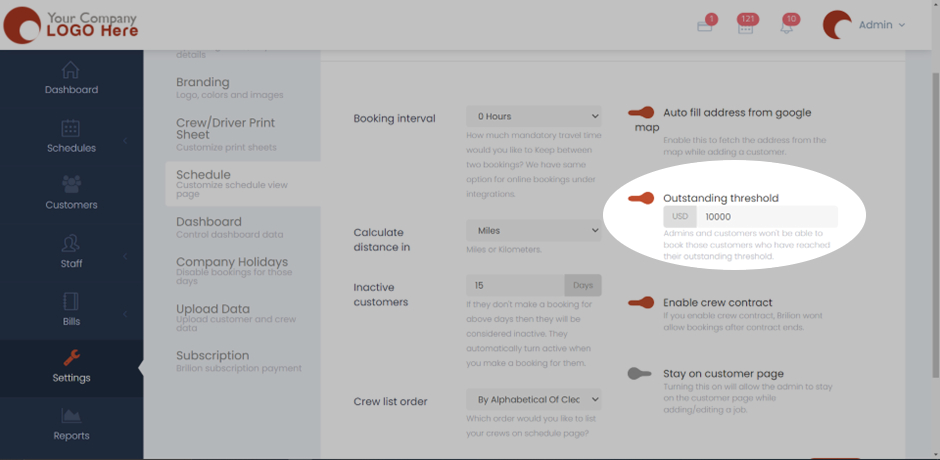
  • Here we’ve taken the Outstanding threshold to be USD 10000. Admins and customers won’t be able to book those customers who have reached their outstanding threshold.
  • Hit Save and now the outstanding threshold to all clients will be applied.
 
Getting startedScheduling

About info

View all posts by info →

Related Articles

  • Setting time slots for online booking
  • Marking a customer active/inactive
  • Enabling today and future days booking notifications for your crews
  • Deleting a receipt in case payment is not made/ Recovering an invoice

Categories

  • 14Communications
  • 8Crew App
  • 2Customer App
  • 25Getting started
  • 5Integrations
  • 9Invoices and Payments
  • 1Marketing
  • 13Online Booking
  • 29Scheduling

Most Viewed

  • Add multiple jobs for a single customer on the same day 9
  • Deleting or adjusting an invoice 7
  • Adding a note that appears on every job 7
  • Allocating Driver Zones 5
  • Adding a crew member and generating password for the crew app 4

Most Liked

© 2024 , Brilion Technologies | All Rights Reserved | Privacy Policy | Terms & Conditions