Help Brilion Help Brilion

  • Home
  • Magazine
  • Help Center
Home / Communications / SMS Credits

SMS Credits

3 views Less than a minute 0
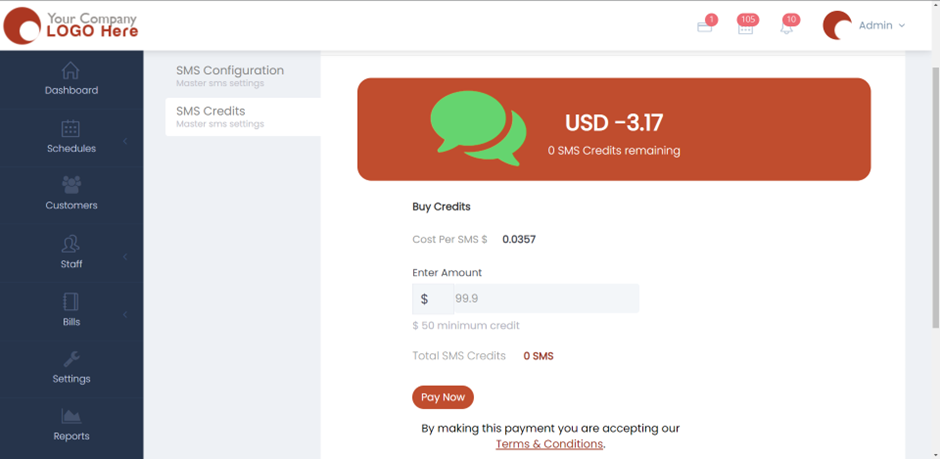
SMS credits are the number of SMS that you’ll receive after you purchase them. These are used to send SMS to your customers for them to get notified about the latest update(s) from your company. You will need to purchase SMS credits in order to use this functionality. For this, please head over to Settings > Communication > SMS Credits.
Now, based on the location it’ll detect the Cost Per SMS in USD. Once you enter the amount, it will show the Total SMS credits that you’ll receive. Click Pay Now and make the payment. You will receive the SMS credits once the payment has been received.  

Communications

About info

View all posts by info →

Related Articles

  • Marking a customer active/inactive
  • Enabling today and future days booking notifications for your crews
  • Deleting a receipt in case payment is not made/ Recovering an invoice
  • Viewing and sending the receipt for a customer

Categories

  • 14Communications
  • 8Crew App
  • 2Customer App
  • 25Getting started
  • 5Integrations
  • 9Invoices and Payments
  • 1Marketing
  • 13Online Booking
  • 29Scheduling

Most Viewed

  • Add multiple jobs for a single customer on the same day 9
  • Deleting or adjusting an invoice 7
  • Adding a note that appears on every job 7
  • Allocating Driver Zones 5
  • Adding a crew member and generating password for the crew app 4

Most Liked

© 2024 , Brilion Technologies | All Rights Reserved | Privacy Policy | Terms & Conditions